




Project Tracker: The Complete Guide to Tracking Projects
Managing projects used to be simpler. Everyone sat in the same office. Progress was visible just by walking around. Not anymore.
Teams now span cities, countries, and time zones. Half the people work from home. The other half split time between the office and the couch. And somehow, everyone needs to stay coordinated.
That’s tough. Really tough.
A project tracker solves this problem. It’s the central hub where deadlines live, budgets get monitored, and chaos turns into clarity. This guide explains what is project tracking, why companies can’t function without it, and how to track project progress when teams are everywhere.
What Is Project Tracking?
Project tracking is monitoring what’s actually happening versus what was supposed to happen.
Planning sets up the roadmap. Tracking shows whether anyone’s following it. Big difference between the two:
- Planning phase: Creating timelines, assigning budgets, and defining deliverables
- Tracking phase: Watching execution unfold, catching problems, adjusting course
A project tracker keeps all this information in one place. No more hunting through email chains or asking “who’s working on what?” three times a day.
When tracking works, teams know their status without playing 20 questions with their manager.
Why Project Tracking Matters
Good tracking creates transparency. Bad tracking creates excuses.
Here’s what changes when tracking is done right:
- Accountability becomes automatic. People know someone’s watching the scoreboard. Tasks get finished because progress is visible.
- Problems surface early. A one-day delay gets noticed today, not three weeks from now when it’s become a crisis.
- Resources get used intelligently. See who’s swamped and who’s idle. Redistribute work before someone burns out or quits.
- Budgets stay intact. Track spending as it happens. No more surprise overruns discovered during final reviews.
For remote teams, tracking is survival. Without it, projects drift into the void. Nobody knows what anyone else is doing. Deadlines become suggestions.
Core Features of a Project Tracker
The right project tracker includes these essentials:
Task & Milestone Tracking
Break projects into bite-sized pieces. Assign each piece to someone specific. Set deadlines that actually mean something. Milestones create momentum. They’re finish lines that keep teams moving forward instead of wandering in circles.
Resource Management
Who’s available right now? Who’s buried under three urgent deadlines? Resource management prevents the classic mistake: piling work on the same reliable people until they crack.
Time Tracking
How long do things really take? Not how long they should take according to the original estimate—how long they actually take. This data makes future planning realistic instead of optimistic fiction.
Collaboration Tools
File sharing. Comments. Updates. All in one spot. No more version control nightmares. No more “I emailed you that last Tuesday” arguments.
Reporting & Dashboards
Management needs answers fast. Dashboards provide them without requiring a status meeting.
Stakeholders get real-time visibility. Project managers stop spending half their day answering “where are we?” questions.
| Feature | What It Does | Why It Matters |
| Task Tracking | Monitors individual deliverables | Prevents work from falling through cracks |
| Resource Management | Shows team capacity and workload | Stops burnout before it starts |
| Time Tracking | Records actual hours spent | Makes future estimates accurate |
| Collaboration | Centralizes communication | Eliminates scattered information |
| Dashboards | Displays project health instantly | Speeds up decision-making |
How to Track Project Progress Effectively?
Tracking a project requires both process and tools. Here’s the process:
- Define What Success Looks Like
- Chunk Work Into Manageable Tasks
- Use Milestones as Checkpoints
- Let Dashboards Do the Talking
- Hold Focused Review Sessions
Define What Success Looks Like
Vague goals guarantee failure. “Improve customer satisfaction” means nothing. “Reduce support ticket response time to under 2 hours” means something.
Set specific KPIs. Make them measurable. Share them with everyone.
Chunk Work Into Manageable Tasks
Nobody finishes “redesign the website.” That’s too big, too overwhelming.
But someone can finish “create mobile homepage mockup” by Thursday. Small tasks create momentum and clarity.
Give each task an owner. “The team will handle it” is code for “nobody will handle it.”
Use Milestones as Checkpoints
Milestones aren’t arbitrary dates. They’re decision points.
Hit the milestone? Great, move forward. Miss it? Stop and figure out why before continuing.
Let Dashboards Do the Talking
Stop asking for status updates. Look at the dashboard instead.
Modern tools like ProHance track progress automatically. No manual reports. No memory lapses. Just data.
Hold Focused Review Sessions
Weekly check-ins keep everyone aligned. But keep them tight. Talk about blockers, decisions, and risks. Skip the detailed status reports that belong in the dashboard.
This system makes how to track project progress less about paperwork and more about actual results.
Challenges in Tracking a Project
Even smart teams struggle with tracking. Common problems:
- Remote work creates blind spots. Can’t see what people are doing. Can’t tell if someone’s stuck or sailing smoothly.
- Task ownership gets fuzzy. In distributed teams, unclear responsibility leads to duplicated effort or forgotten work. Both waste time and money.
- Spreadsheets fall apart fast. Excel tracking works until the second person edits it. Then chaos. Conflicting versions, missing data, formulas that break mysteriously.
- Updates arrive late. Manual reporting means stale information. Decisions get made based on yesterday’s reality, not today’s.
- Workload imbalance stays hidden. One person drowns while another waits for assignments. Without visibility, this continues until someone snaps.
Role of ProHance in Project Tracking
ProHance works differently from traditional project tracker tools.
Instead of waiting for someone to update a spreadsheet, it captures work patterns automatically. Real work. Real progress. Real-time.
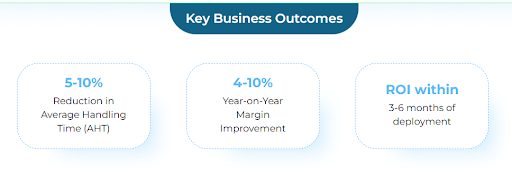
What This Means Practically:
Managers see the actual status. Not what someone reported three days ago.
- Workloads get balanced proactively. Spot overload before it becomes a problem. Redistribute tasks while there’s still time.
- Costs stay controlled. Track where hours go and money flows. Identify waste before it compounds.
- Hybrid teams work smoothly. Remote and in-office employees get equal visibility. Location stops mattering.
ProHance redefines what is project tracking for modern work. It’s about intelligence and insight, not surveillance and suspicion.
Teams get autonomy. Managers get visibility. Both get better results.
Conclusion
Projects fail for predictable reasons. Poor visibility. Unclear ownership. Late interventions. Resource mismanagement. Project tracking prevents all of this. But only if done properly.
Organizations need smarter systems. ProHance provides exactly that—automated tracking that shows reality without creating an administrative burden.
The companies winning at tracking a project aren’t working harder. They’re tracking smarter.
Worth considering for any team serious about delivering on time and on budget.
FAQs
How do you track project progress effectively?
Start with measurable goals. Break work into specific tasks with clear owners. Set meaningful milestones. Use automated dashboards instead of manual reports. Review regularly but efficiently.
What are the key features of a good project tracker?
Look for comprehensive task tracking, intelligent resource management, accurate time tracking, integrated collaboration tools, and real-time dashboards. These features together create complete project visibility.
How does ProHance improve tracking a project in real time?
ProHance automatically captures work patterns without requiring manual updates. This provides objective, current data on progress, workload distribution, and resource usage – critical advantages for hybrid and remote teams.
Learn how ProHance can help

Salik Faraz
Marketing specialist with more than 4 years of work experience in Digital Marketing focusing on Lead Generation and Brand building within the SaaS, Fintech, and Ecommerce sectors. He is skilled in utilizing analytics and marketing tools to optimize Brand Awareness.
