
What Is Project Tracking Software? Best Way to Track Projects in Real Time with Tools
Table of Contents
- What Is Project Tracking?
- Why Project Tracking Matters for Modern Organizations
- How Does an Online Project Tracker Simplify Project Tracking?
- Why Is Project Tracking Important?
- How to Track Project Progress Effectively
- Project Tracking Tools and Software Options
- Features to Consider While Choosing a Project Tracking Software
- How to Set Up Your Project Tracker
- How to Track Your Project Progress with a Project Tracker
- Using Project Tracking Data to Improve Team Performance
- ProHance Project Tracking Software for Real-Time Visibility and Control
What Is Project Tracking?
Project tracking is the structured process of monitoring tasks, timelines, resources, and team performance to ensure projects remain aligned with defined objectives. It plays a central role in project management tracking by providing continuous visibility into how work is progressing against plans.
At its core, project tracking focuses on three critical elements: task tracking, time management, and resource allocation, all of which are strengthened when integrated with employee time tracking software that captures accurate effort data across projects. A project tracker enables teams to follow individual tasks, monitor dependencies, and assess whether milestones are being achieved on schedule. This structured oversight helps maintain accountability and reduces the risk of scope creep or missed deadlines.
Project tracking is especially important in environments where employees work primarily on desktops or laptops, and multiple projects run simultaneously. In such settings, accurate project progress monitoring ensures that effort is aligned with priorities and that teams remain focused on outcomes rather than activity alone.
Why Project Tracking Matters for Modern Organizations
The importance of project tracking becomes clear when organizations examine the cost of ineffective execution. Poor visibility into tasks, timelines, and dependencies often leads to missed deadlines, budget overruns, and strained collaboration.
Research consistently shows that organizations lose a significant portion of resources due to ineffective project management practices. High-performing teams, on the other hand, are far more likely to rely on structured project management tracking and software project tracking tools. These teams benefit from clarity, predictability, and faster issue resolution.
Another challenge organizations face is documentation fatigue. Many managers spend considerable time preparing status reports that add limited value and often go unread. A centralized project tracking system reduces this burden by automatically capturing progress data and generating real-time insights. This allows managers to focus on execution and decision-making rather than manual reporting.
Effective project tracking replaces fragmented updates with a single source of truth, ensuring that teams, stakeholders, and leaders operate with shared visibility.
How Does an Online Project Tracker Simplify Project Tracking?
An online project tracker acts as the operational backbone of project tracking. It simplifies complexity by consolidating project information and enabling real-time coordination across teams. Rather than relying on disconnected tools or manual follow-ups, teams use a project tracking software platform to manage work centrally.
Centralized Information Hub
A project tracker serves as a single source of truth by storing tasks, timelines, ownership, and project documentation in one place. This eliminates confusion caused by scattered information and ensures that everyone has access to the latest project updates.
Real-Time Project Tracking
Real time project tracking allows teams to see progress as it happens. Managers can identify delays early, monitor task completion, and take corrective action before issues escalate. This visibility is critical for maintaining delivery timelines.
Clear Task Ownership and Accountability
Project tracking software enables clear task assignment with defined responsibilities and deadlines. This clarity reduces ambiguity, strengthens accountability, and ensures that work does not fall through the cracks.
Deadline and Milestone Management
Automated reminders and milestone tracking help teams manage multiple deadlines effectively. The project tracker alerts stakeholders to upcoming due dates, supporting timely execution and reducing last-minute escalations.
Collaboration and Communication Enablement
An online project tracker also acts as a collaboration platform. Teams can share updates, comment on tasks, and resolve issues within the system, reducing reliance on fragmented communication channels.
Issue Identification and Resolution
When challenges arise, project tracking tools allow teams to log issues, assign owners, and track resolution progress. This structured approach accelerates problem-solving and minimizes disruption.
Data-Driven Progress Reporting
Project tracking software generates progress reports that provide insights into performance trends, bottlenecks, and risks. These reports support informed decision-making and continuous improvement.
Why Is Project Tracking Important?
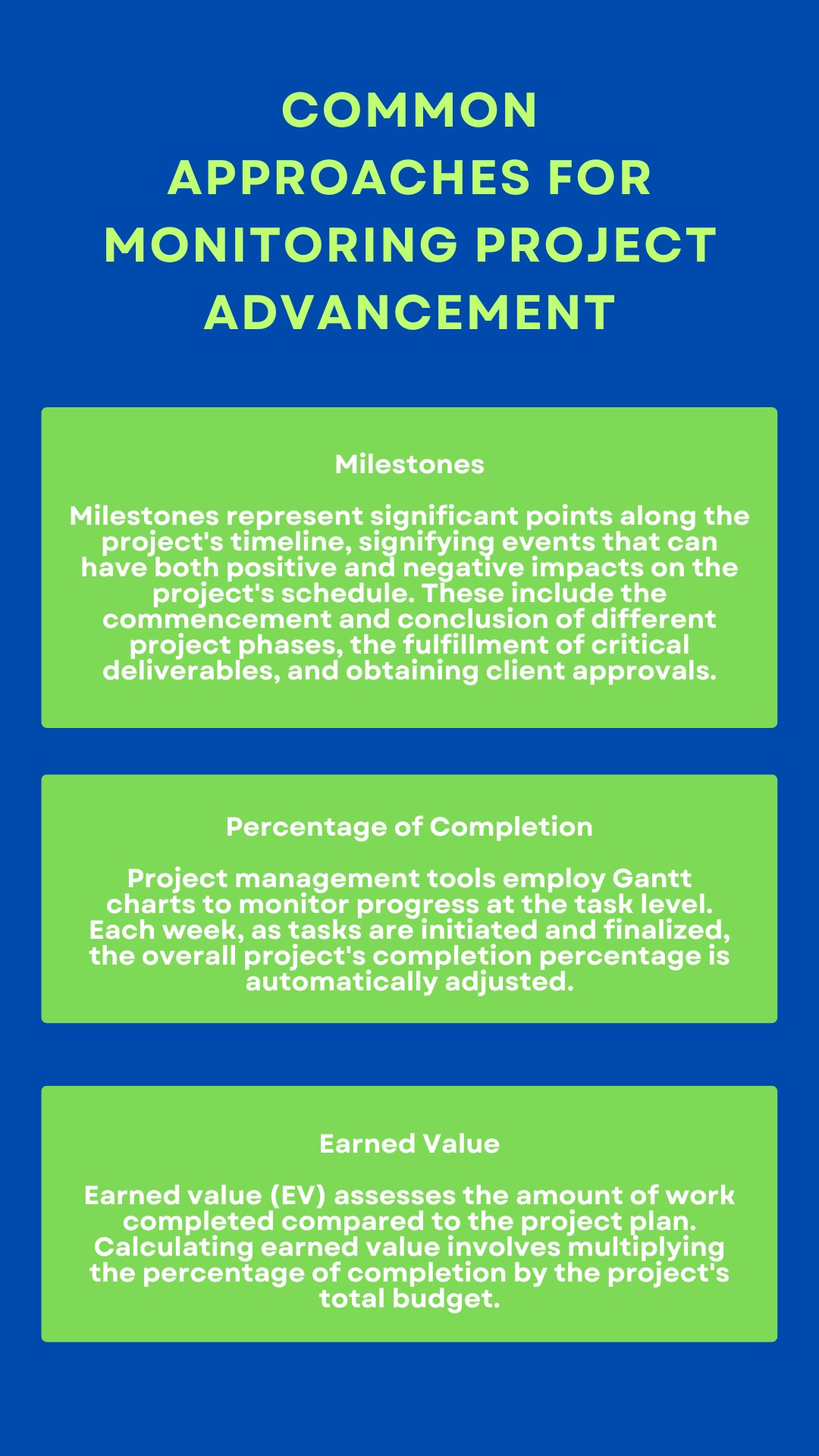
Project tracking plays a critical role in ensuring that projects are delivered on time, within scope, and within budget. Without effective project tracking, teams operate reactively, often discovering issues only after they have impacted delivery.
One of the primary benefits of project tracking is improved time management. By monitoring task progress and dependencies, teams can plan work more effectively and avoid delays. Project trackers also help identify bottlenecks early, allowing managers to reallocate resources or adjust priorities proactively.
Consistent project tracking supports performance visibility at both team and individual levels. It enables managers to understand contribution patterns, optimize resource utilization, and improve collaboration. Ultimately, effective project tracking enhances control, predictability, and execution quality across the organization.
How to Track Project Progress Effectively
Best practices, methods, and workflows
Knowing how to track projects effectively requires more than selecting a tool. It involves combining structured workflows, clear milestones, and real-time visibility to ensure projects remain aligned with business objectives. Organizations that succeed at project progress tracking treat it as an ongoing discipline rather than a one-time setup.
A structured approach to project tracking methods typically includes the following elements.
Define Clear Workflows and Milestones
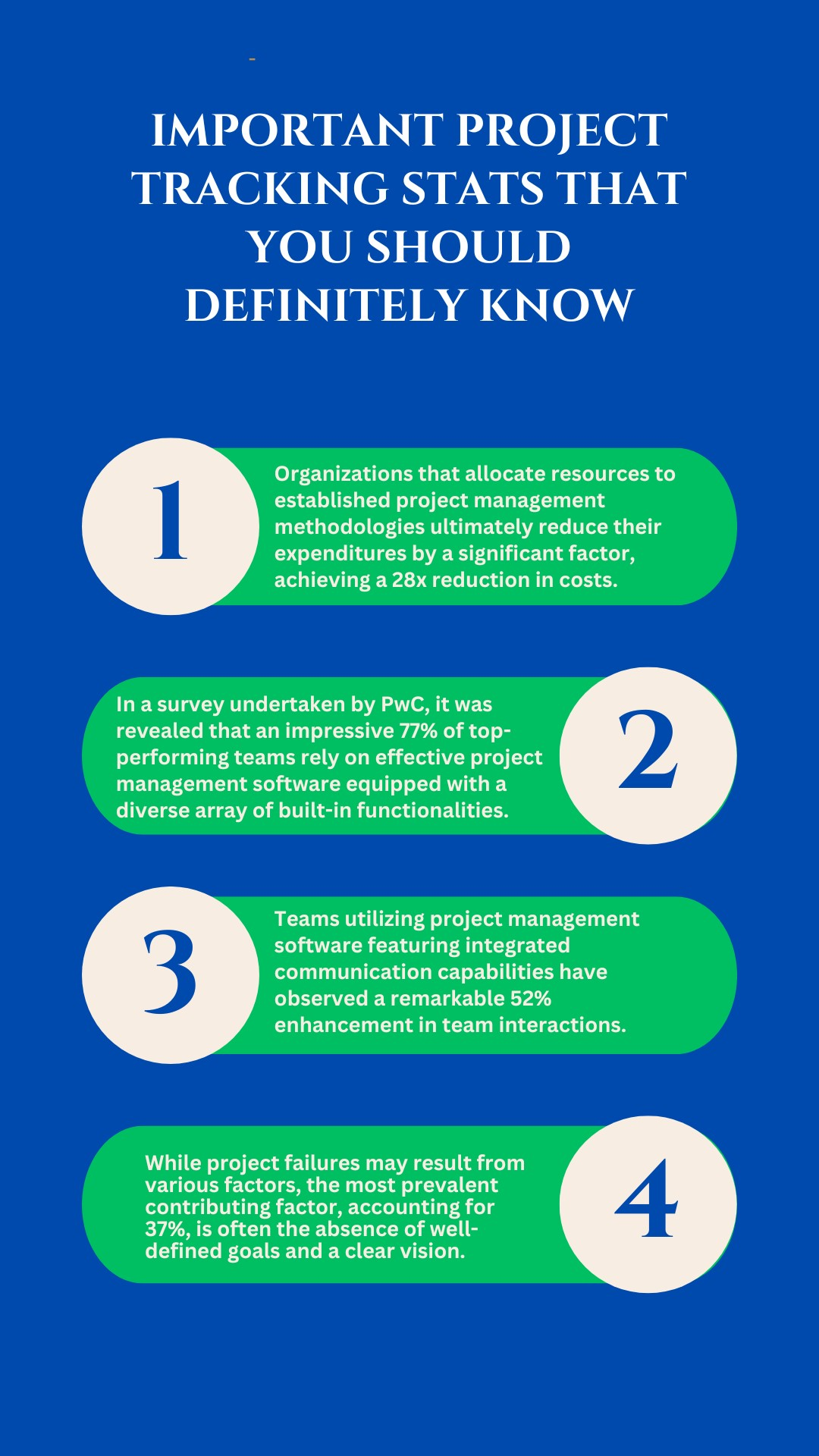
Every project should begin with a clearly defined workflow that outlines phases, dependencies, and approval points, supported by workflow automation software that ensures consistency, reduces manual intervention, and accelerates execution. Breaking work into milestones creates measurable checkpoints that make progress visible and manageable. Milestones help teams understand whether delivery is on track and allow leaders to intervene early when deviations occur.
Use Real-Time Updates Instead of Periodic Check-Ins
Real time project tracking reduces reliance on manual status meetings and retrospective reporting. When teams update tasks as work progresses, project managers gain continuous visibility into execution. This enables faster decision-making and prevents small delays from becoming major risks.
Track Progress at Task and Project Levels
Effective project progress tracking happens at multiple levels. Task-level tracking ensures individual responsibilities are clear and measurable, while project-level tracking provides a consolidated view of overall delivery status. Combining both perspectives helps organizations balance detail with strategic oversight.
Apply Data-Driven Decision-Making
Project tracking data should inform decisions around prioritization, resourcing, and timelines. When leaders use objective project performance data rather than intuition, they can adjust plans confidently and maintain delivery predictability across multiple initiatives.
Project Tracking Tools and Software Options
Organizations can choose from several types of project tracking tools depending on complexity, scale, and reporting needs. Understanding the strengths and limitations of each option helps teams select the right software project tracking tool for their environment.
Spreadsheets
Spreadsheets are often used as entry-level project tracking tools. They are cost-effective and flexible but become difficult to manage as project complexity grows. Manual updates, limited collaboration, and lack of real-time visibility make spreadsheets unsuitable for large or fast-moving projects.
Task Management Tools
Task management tools are designed specifically for tracking tasks, deadlines, and ownership. They improve visibility compared to spreadsheets and support collaboration, but may lack deeper analytics, workflow automation, and performance insights required at an enterprise level.
Software Project Tracking Tools
Comprehensive software project tracking tools combine task management, workflow tracking, time visibility, and reporting. These platforms support complex projects, distributed teams, and data-driven oversight. They enable organizations to move from reactive tracking to proactive project management.
Features to Consider While Choosing a Project Tracking Software
Selecting the right project tracking software requires careful evaluation of features that support both execution and oversight. Task assignment and delegation capabilities ensure responsibilities are clearly defined and traceable. Deadline and milestone tracking features help teams stay aligned with delivery timelines and reduce the risk of missed commitments.
Collaboration features such as shared workspaces and task-level communication improve coordination across teams. Reporting and analytics capabilities provide visibility into progress, risks, and performance trends, and when powered by advanced workplace analytics software, they enable deeper operational insights and smarter decision-making. Integration with existing systems ensures project tracking fits seamlessly into current workflows rather than operating in isolation.
Scalability is also critical. As project volume and complexity increase, the tracking tool must support additional users, data, and reporting requirements without performance degradation.
How to Set Up Your Project Tracker
Setting up a project tracker begins with creating a detailed project plan that outlines objectives, scope, tasks, and milestones. Breaking the project into manageable tasks ensures clarity and realistic effort estimation. Assigning tasks establishes accountability and ownership across the team.
Clear deadlines and milestones provide structure and motivation while enabling progress measurement. A well-configured project tracker ensures that all stakeholders share a common understanding of priorities and expectations from day one.
How to Track Your Project Progress with a Project Tracker
Once the tracker is set up, consistent usage determines its effectiveness.
Keep Project Data Updated
Regular updates ensure that project tracking data reflects reality. Teams should log progress, challenges, and changes as work evolves. Accurate data is essential for reliable decision-making.
Monitor Trends and Variations
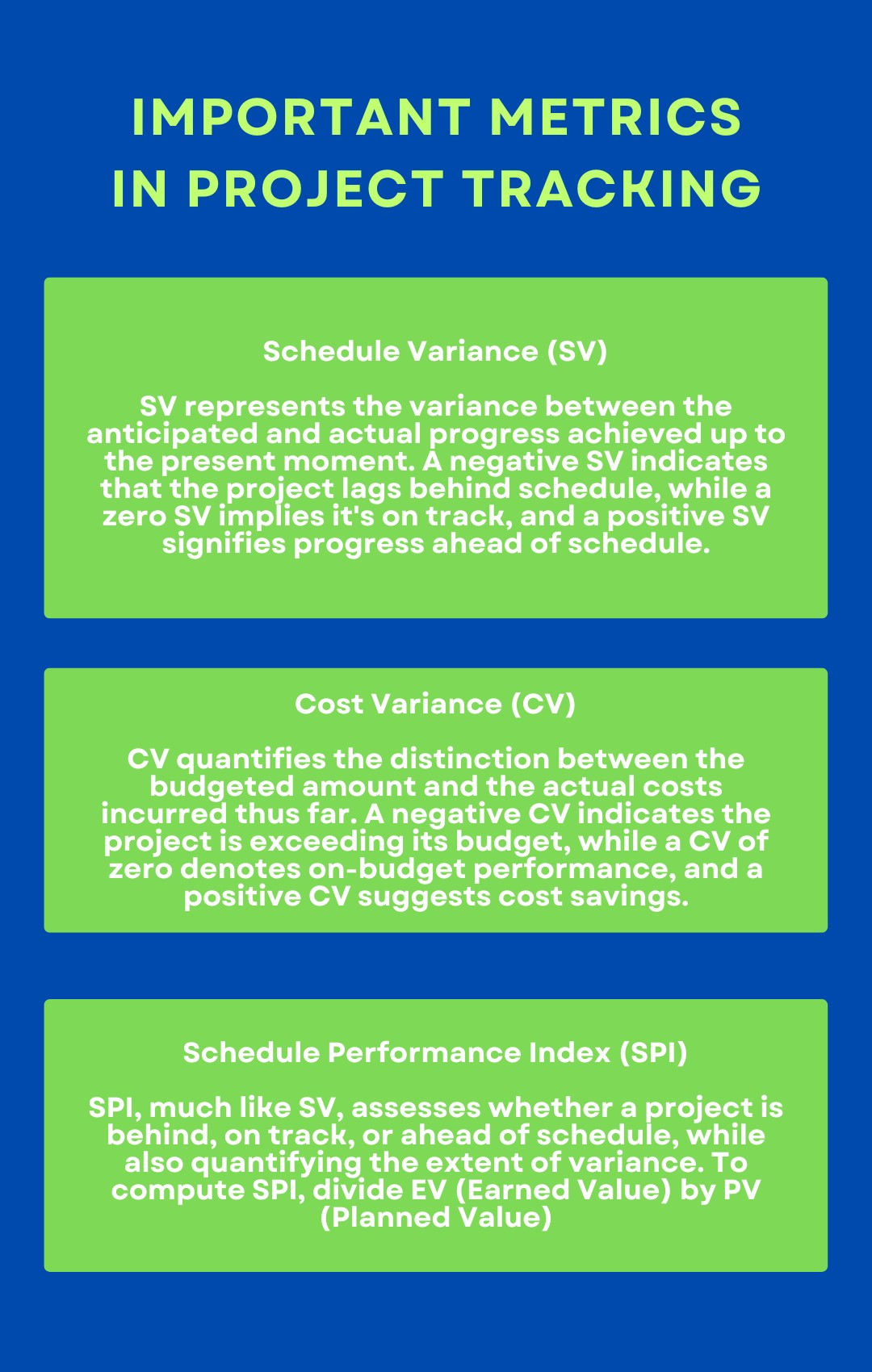
Project tracking software makes it easier to identify deviations from plan. Monitoring trends across tasks and milestones allows managers to address issues proactively rather than reactively.
Resolve Issues Through Structured Collaboration
When obstacles arise, the project tracker should be used to document issues, assign resolution owners, and track outcomes. This structured approach accelerates problem resolution and maintains accountability.
Using Project Tracking Data to Improve Team Performance
One of the most valuable outcomes of project tracking is the data it generates. Over time, this data reveals patterns related to delivery speed, workload distribution, and recurring bottlenecks.
Generate Performance Reports
Reporting features help organizations analyze progress over time and compare performance across projects. These insights highlight strengths and identify areas requiring improvement.
Identify Opportunities for Optimization
Reviewing project tracking data enables teams to optimize workflows, rebalance resources, and refine planning assumptions. Data-driven improvements lead to more predictable delivery and better team performance.
Adapt Plans Based on Insights
Effective project management requires flexibility. Insights from project tracking data should inform adjustments to scope, timelines, or resourcing as conditions change.
ProHance Project Tracking Software for Real-Time Visibility and Control
ProHance provides project tracking capabilities designed for organizations managing knowledge workers on desktops and laptops. It enables real-time visibility into tasks, workflows, and project progress while aligning effort with outcomes.
As a project tracking solution, ProHance supports structured workflows, performance insights, and data-driven decision-making. Organizations use it to improve delivery predictability, optimize resource utilization, and maintain control across multiple projects without relying on fragmented tools.
Q1. What is a project tracker and why is it important?
A project tracker is a software tool used to monitor tasks, deadlines, and progress. It is important because it provides visibility, accountability, and control throughout the project lifecycle.
Q2. How to effectively track projects?
Effective project tracking combines clear workflows, real-time updates, milestone monitoring, and data-driven decision-making using project tracking software.
Q3. Why use software instead of spreadsheets for project tracking?
Software project tracking tools provide real-time visibility, automated reporting, and collaboration features that spreadsheets cannot scale or support effectively.
Q4. How to create and customize a project tracker?
Customization involves defining workflows, task structures, milestones, and reports aligned with project requirements and team processes.
Q5. Can you track multiple projects at once?
Yes. Project tracking software allows organizations to manage multiple projects simultaneously while maintaining visibility into resource utilization and priorities.
Q6. How to prioritize tasks using a project tracker?
Tasks can be prioritized based on deadlines, dependencies, impact, and workload data available within the project tracker.
Q7. Can I track multiple projects at once using ProHance?
Yes. ProHance provides you with insight into how teams spend time across various tasks and projects. This helps you better comprehend resource utilization, recognize workload trends, and make sure several projects go smoothly without overwhelming teams.
Q8. What is a project tracker, and why is it important in project management?
A project tracker is a software tool designed to monitor and manage project tasks, deadlines, and team progress. It’s essential in project management to ensure efficient time management and project success.
Q9. What is the best way to track projects effectively at work?
The best way to track projects at work is by using project tracking software or a project management tracker. These tools help you organize tasks, manage time efficiently, and monitor project progress.
Q10. How can time management in project management be improved with a project tracker?
A project tracker aids in time management by providing a central platform to allocate, monitor, and adjust task timelines. It helps teams stay on schedule and avoid delays.
Q11. What steps can I take to effectively track projects using a project management tracker?
To effectively track projects using a project management tracker, start by creating a project plan, breaking tasks down, assigning responsibilities, setting deadlines, and regularly updating the tracker.
Q12. Why should I use software for project tracking instead of spreadsheets?
Spreadsheets will do for small tasks, but as projects expand, they become hard to control. A software project tracking tool offers real-time feedback, reports that are created automatically, and collaboration options that spreadsheets cannot provide. It is less work for humans, reduces mistakes, and allows managers to see clearly and centrally into tasks, deadlines, and team status.
Q13. Is ProHance an online project tracker or desktop-based software?
ProHance is an adaptable solution that functions as an online project tracker and also accommodates desktop-based workflows. This makes it ideal for companies with employees who work mostly on desktops or laptops. It ensures that time, productivity, and project progress are tracked easily, wherever the work is being done.
Learn how ProHance can help

Salik Faraz
Marketing specialist with more than 4 years of work experience in Digital Marketing focusing on Lead Generation and Brand building within the SaaS, Fintech, and Ecommerce sectors. He is skilled in utilizing analytics and marketing tools to optimize Brand Awareness.